
Description
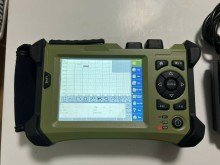
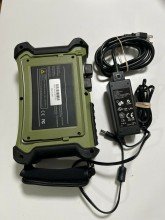
Orientek TR600 SV20A SM OTDR 1310/1550NM, 32/30DB, Integrated 6.4″ VFL. Quick operation instructions for using buttons ]Home button: Escape from the current page and return to the home page directly. The button used together with the [ ] button can realize in the OTDR home page “event, parameters, fiber link, AB cursor” of the information window cycle switch display function. [R/S] Measure/Stop Button: ? In the home page interface, use the buttons directly on the OTDR interface to start the test, to achieve key test operation. ? In the home page of OTDR function module, press this button to start measuring; During the measurement process, press this button to stop measuring. ? On the home page of the OTDR function module, when used together with [Shift], it can be made between the selection of average and real-time measurement mode toggle. In the main interface, you can perform icon selection confirmation function; when performing the menu operation, pressing the button indicates that the current operation takes effect. On the keyboard or in the drop-down list, confirm the corresponding characters and data. In the menu dialog, identify the current operation effect. ] [ ]Up/Down buttons: Select the desired menu icon. From the keyboard or drop-down list, select the appropriate characters or data. In the folder tree structure window, notice that the tree node moves up or down. When used in conjunction with [Shift], it can perform longitudinal amplification and contract display tracking reduction. ] [ ] Left/Right buttons: make the A/B rod move to the left or move to the right in the tracking display window. Choose the selected character on the keyboard. In the Settings menu, make the choice of a different page when you focus on the column page (ie Parameter Settings / File Settings / System Settings). In the folder tree structure window, expand or collapse the subtree. When used together with [Shift], it can perform traversal amplification and contract display tracking reduction. [Esc] Escape button: ? Return to the top operation page. [A-B] A/B scale plates switching button, button main function: ? In the home page of the OTDR function module, you can perform mutual scaling plates A and B in the trace graph area. ? When used together with [Shift], you can make scale plate A (or B) on the trace graph switch to the next event position. [Shift] Shift function button: ? In the home page of the OTDR function module, you can make all the traces shown in the 1 trace graph area. ? In the menu dialog, it serves as a tab switch key role, that is, the function switch below each menu in the dialog box. ? On the OTDR function module home page, the button used in conjunction with the [ ] button you can perform on the OTDR home page “event, parameters, fiber link, AB cursor” of the information window cycle switch display function. ? On the OTDR function module home page, the button used in conjunction with the [?] buttons [?] can perform combined functions of longitudinal amplification and trace reduction. ? On the OTDR function module home page, the button used in conjunction with the [ ] buttons [ ] can perform combined cross-enlargement and trace-reduction functions. ? In the home page of the OTDR function module, the button used together with the [ ] button can realize the options of quick switching between average and real-time measurement. mode. ? On the home page of OTDR function module, the button used together with button [A-B] can realize scale plate A (or B) in the trace graph switching to the next event position. ? When using the shift key combination function, please press the [Shift] button, then press the combination of keys, function realization, first release the key combination, then release the [Shift] key. [ ] Button for power supply: ? Turn on and turn off the power of instrument. Need to press and hold for 2-3 seconds until the power light reaction.

Reviews
There are no reviews yet.